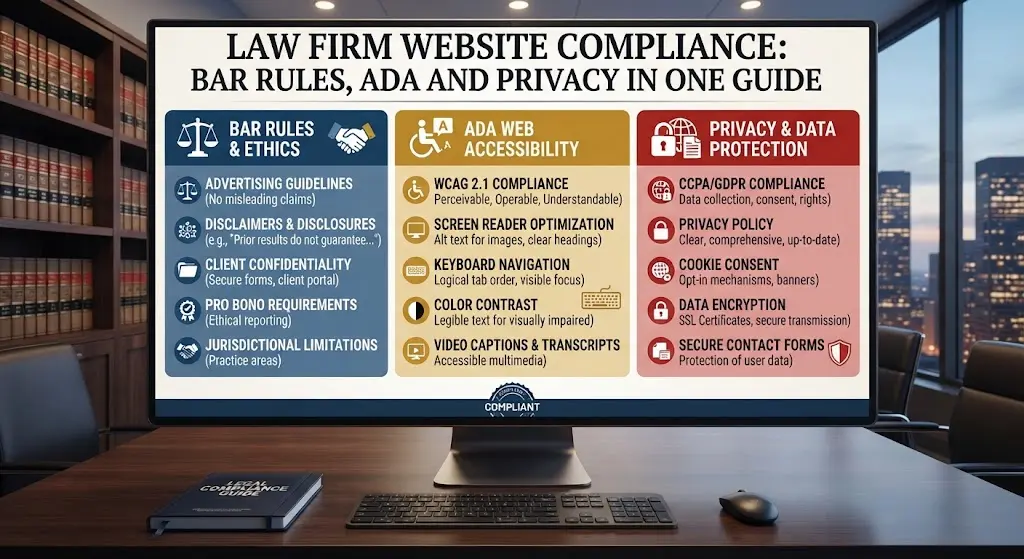

A law firm website carries obligations a generic small-business site simply does not — attorney advertising rules, accessibility law, and privacy requirements all intersect with how the site is built and worded. This guide brings together everything that applies specifically to how your website is designed and structured, in one place. It is not legal advice — always confirm specifics with your state bar or counsel — but it covers the website-design side of compliance clearly.
Why This Sits at the Intersection of Legal and Technical
Compliance requirements for a law firm website are unusual in that they require both legal judgment (what does your state bar actually require) and technical execution (how is that requirement actually implemented in the site’s code and content). A firm’s own counsel can advise on the legal requirement; a specialist web developer translates that requirement into an actual disclaimer placement, color contrast ratio, or form field. Neither side alone is sufficient — a compliant-sounding disclaimer buried where no visitor will ever see it satisfies neither the letter nor the spirit of the requirement, and a beautifully placed disclaimer with the wrong legal language creates its own risk.
Attorney Advertising Rules and Your Website
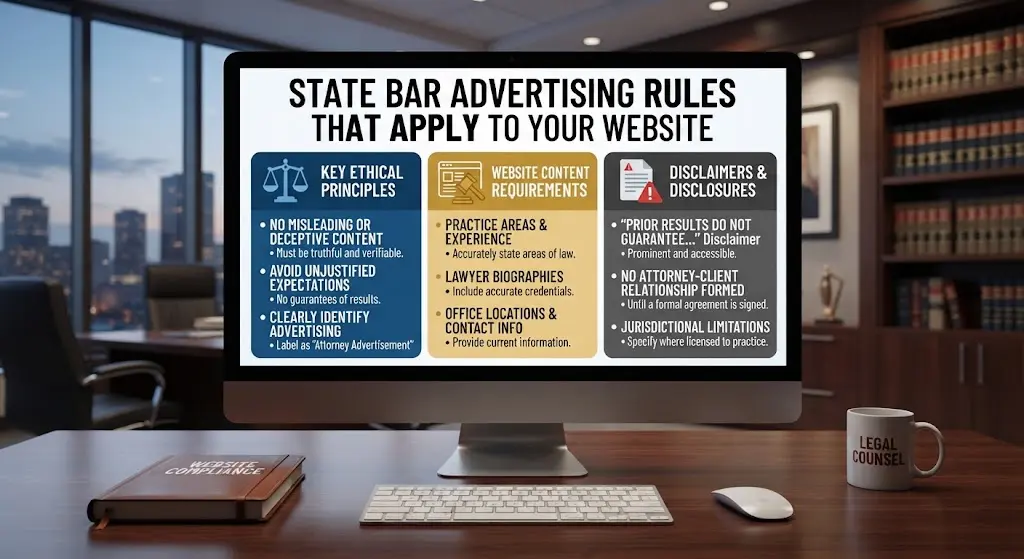
Most state bars regulate how attorneys can advertise, and a website counts as advertising in nearly every jurisdiction. Common requirements include a clear disclaimer that past results do not guarantee future outcomes, identification of the responsible attorney, and restrictions on claims of specialization unless formally certified. Rules vary meaningfully by state, so specifics need to be checked against your own bar’s current guidelines — our full breakdown of the state-by-state landscape is in state bar advertising rules that apply to your website.
Avoiding an Unintended Attorney-Client Relationship
Contact forms and chat widgets need careful language — a visitor submitting details through a poorly worded form could, in some interpretations, believe an attorney-client relationship has begun before any formal engagement. Standard practice is a clear disclaimer near any intake form stating that submitting information does not create representation until a formal agreement is signed.
For a complete breakdown of every disclaimer category and where each belongs on the page, see attorney website disclaimers: what to include and where.
Case Results and Testimonials
Displaying case results or client testimonials is generally allowed but heavily regulated — nearly every state requires a disclaimer that results depend on the specific facts of each case and do not guarantee a similar outcome. Some states additionally restrict specific dollar figures or require particular disclaimer placement. This is one of the areas where getting the wording wrong carries real professional risk, not just a design inconvenience.
For the complete guide to publishing testimonials and results compliantly, see publishing testimonials and case results without breaking the rules.
This is especially central for personal injury firms specifically — see personal injury law firm website: the complete design guide for how results and compliance intersect in that practice area.
ADA Accessibility: What It Actually Requires
ADA accessibility has become a genuine source of legal exposure for businesses, including law firms themselves, when their own websites are inaccessible. Practically, this means sufficient color contrast, keyboard-navigable menus and forms, descriptive alt text on images, and proper heading structure for screen readers. These are technical, buildable requirements — not abstract legal concepts — and should be built in from the start rather than retrofitted after a complaint.
For the complete, concrete accessibility checklist, see law firm website accessibility: ADA compliance made simple.
Beyond the basics, a genuinely accessible site also needs functioning skip-navigation links for screen reader users, video captions where video content is used, and forms with properly associated labels rather than placeholder text alone — a detail that looks fine visually but fails for anyone using assistive technology. Testing with an actual screen reader, or at minimum a browser accessibility checker extension, catches issues that are invisible to a sighted developer clicking through the site normally.
Privacy Policy and Data Handling
Any site collecting contact form submissions needs a privacy policy explaining what data is collected and how it is used. Depending on your state and whether you serve clients in states with specific privacy laws (like California), additional disclosures may be required. A generic, unreviewed privacy policy template copied from another industry’s site is a common and easily avoidable gap.
For the complete privacy policy, CCPA, and cookie notice breakdown, see privacy policies, CCPA and cookie notices for law firm sites.
Beyond a basic privacy policy, some firms need to think about how long form submissions are retained, whether data is shared with any third-party tools (analytics, email marketing platforms), and whether the site’s hosting itself stores form data securely. A privacy policy that accurately describes what actually happens with visitor data — rather than a generic template that describes practices the site does not actually follow — is both more compliant and more trustworthy to a privacy-conscious visitor.
Cookie Consent and Tracking
If your site uses analytics or advertising tracking cookies, a cookie consent notice is standard practice, and required outright in some jurisdictions. This is a straightforward technical addition — a simple banner with accept/decline options — that is frequently overlooked entirely on smaller law firm sites.
Why State-by-State Variation Matters So Much
Unlike general web accessibility or privacy law, which apply fairly uniformly, attorney advertising rules are set individually by each state bar, and they genuinely differ in meaningful ways. Some states require a specific disclaimer font size or placement; others regulate whether the word “specialist” can be used at all without formal board certification; still others have specific rules about how case results can be presented numerically. A firm licensed in multiple states, or a firm that markets across state lines, needs to account for the strictest applicable rule across all relevant jurisdictions, not just the rule in its primary state. This is precisely the kind of detail a specialist legal-industry web developer tracks as a matter of course, and a generalist agency has no particular reason to know about.
A Compliance Checklist for Your Website
- Attorney advertising disclaimer, checked against your specific state bar rules
- No-attorney-client-relationship language near every contact form
- Case result and testimonial disclaimers where applicable
- ADA-accessible color contrast, navigation, and alt text
- A reviewed, specific privacy policy
- Cookie consent notice if using tracking
Auditing an Existing Site for Compliance Gaps
If your site has been live for a while without a recent compliance review, walk through it methodically: check every page with a testimonial or case result for the required disclaimer, run the homepage and one practice area page through a free accessibility checker tool, confirm the privacy policy actually matches what the site does, and verify the contact form includes the no-relationship-created language. This kind of audit typically takes under an hour for a straightforward solo attorney site, and surfaces gaps that accumulate silently over years — a disclaimer that was compliant when the site launched but has since fallen behind an updated bar rule, for example.
Why Generalist Agencies Miss This
A web design agency that builds sites for restaurants, contractors, and law firms alike has no particular reason to know attorney advertising rules exist, let alone how they vary by state. This is precisely the gap a specialist agency working exclusively with law firms is positioned to close — not by giving legal advice, but by building the site correctly around requirements a generalist would never think to ask about.
What Fixing Compliance Gaps Actually Costs
Most compliance fixes are inexpensive relative to the risk they address — adding or correcting a disclaimer is often a matter of minutes for a developer with admin access, and a basic accessibility pass (contrast adjustments, alt text, form labels) on an existing site typically runs a few hundred dollars rather than requiring a full rebuild. The exception is when compliance gaps are discovered alongside a genuinely outdated site that needs broader work anyway — in that case, the compliance fix becomes part of a larger redesign rather than a standalone task. Either way, the cost of fixing these gaps proactively is consistently smaller than the cost of addressing them reactively after a complaint or bar inquiry.
Common Questions About Law Firm Website Compliance
Is this article legal advice?
No. This covers the website-design side of compliance in general terms. Always confirm specific requirements with your state bar or legal counsel, since rules vary by jurisdiction and change over time.
How often do these requirements change?
State bar advertising rules and accessibility standards both evolve periodically — a site built to be compliant at launch can drift out of compliance years later if nobody reviews it, which is one reason ongoing maintenance matters beyond just technical upkeep.
Bankruptcy practice specifically carries its own federal disclosure requirement beyond general state bar rules — see bankruptcy attorney website design guide.
Does a small solo practice need to worry about this as much as a large firm?
Yes — these requirements apply regardless of firm size. A solo attorney’s site carries the same disclaimer and accessibility obligations as a fifty-attorney firm’s site.
Should compliance language be reviewed by an attorney, not just a developer?
Yes — a developer can implement the technical placement and structure correctly, but the actual legal wording of disclaimers should be reviewed by someone at the firm familiar with your state’s current bar rules, ideally before the site launches rather than after.
Does adding a chatbot or live chat widget introduce new compliance considerations?
Yes — any tool capturing visitor information in real time should include the same no-attorney-client-relationship language as a standard contact form, and ideally a note that responses may not be immediate or from a licensed attorney if the chat is staffed by non-attorney personnel.
Bottom Line
Compliance is not a separate concern from good design — the strongest law firm websites build these requirements in from the start, as part of the design itself. See how we build compliance into every project →
Attorney Website Designers builds law firm websites with compliance built in from day one, exclusively for attorneys across the USA. Book a free 15-minute call to see our process.